

AI product photography for Amazon sellers has moved fast in 2026, but the conversation has mostly been about tools, not strategy. Which app to use, how cheap it is, how quickly it generates. What gets less attention is what actually determines whether your AI-generated images help your listing or hurt it: the decisions made before a single image is produced.
This guide is not a tool roundup. It is a practical breakdown of how to think about AI imagery across your full Amazon gallery: which slots suit AI, which require a real photograph, where sellers go wrong, and what the quality bar actually looks like for a listing that converts.
The Rule That Governs AI Product Photography for Amazon Sellers
Amazon’s position on AI imagery in 2026 is clear in one direction and silent in another. The clear part: your main image (image position 1, the one shoppers see in search results) must be a real photograph of the actual product on a pure white background (RGB 255,255,255). No AI-generated main images. No composite backgrounds. No lifestyle context. Just the product, filling at least 85% of the frame, on white. Amazon’s full image requirements are documented in their Seller Central image guidelines.
The silent part: Amazon has no documented policy requiring sellers to disclose AI use for secondary images. The widely repeated claim that Amazon mandated AI disclosure in 2026 traces to third-party blogs, not any Amazon policy page. Their genuine AI disclosure rule applies to Kindle Direct Publishing, a different platform entirely. Secondary images enhanced or generated with AI are permitted provided they accurately represent the product that ships.
That last clause matters more than sellers realise. The compliance risk with AI imagery is not that it was made with AI. It is that it misrepresents the product: showing a size, colour, texture, or feature that does not match what arrives in the box. That risk exists with over-edited traditional photography too. The tool is not the issue. Accuracy is.
Your Nine-Image Gallery: A Slot-by-Slot Strategy
Amazon allows up to nine images per listing. Most sellers treat this as a technical limit rather than a strategic asset. Each slot has a job. Understanding which jobs suit AI and which do not is the foundation of a sensible workflow.
Position 1: Main image (real photograph, non-negotiable)
A real studio photograph of the actual product on pure white. This is not a debate. AI-generated main images that look convincing to a human eye still risk suppression if Amazon’s systems flag inconsistencies between the listing image and the product data. More importantly, if the main image does not accurately represent what ships, you are exposed under UK distance selling regulations regardless of how it was produced.
The main image is also the most technically demanding slot. Pure white (not off-white, not light grey, not cream: the exact RGB value) catches a significant number of sellers out. A professional studio photograph removes that variable entirely.
Positions 2 to 4: Feature and detail shots (AI-assisted or studio)
Close-ups showing texture, materials, construction detail, scale, and product features. These work well with AI when the source photograph is high quality and the product does not have fine detail that the model is likely to hallucinate or smooth over. Products with complex textures (woven fabrics, knurled metal, grain-visible wood) should have these shot in studio. Products with cleaner surfaces can often be handled through AI background removal and enhancement from a good source image.
Positions 5 to 7: Lifestyle and context shots (AI’s strongest slot)
This is where AI genuinely earns its place in an Amazon workflow. Placing your product into a realistic scene (kitchen counter, bathroom shelf, outdoor setting, hands in use) is the most expensive part of a traditional photography brief and the most straightforward for AI to produce at scale. A single studio source image can generate multiple lifestyle variants: different rooms, different demographics, different seasons, without reshooting.
The constraint is still accuracy. The product in the lifestyle scene must match the product in the box. Colour drift, scale distortion, and label inconsistency are the most common failure modes, and they are the seller’s responsibility to catch before upload.
Positions 8 to 9: Infographics and comparison images (AI-assisted)
Dimension diagrams, feature callout graphics, comparison tables, and instructional content. These are typically produced in design software rather than generated from scratch by AI, but AI can provide the product photography element within them. The infographic layer goes on top of a real or AI-enhanced product image.
Where AI Falls Short in an Amazon Context

The tool roundups tend to show AI at its best: clean products, simple shapes, solid colours, unambiguous materials. That is not most sellers’ catalogue. Understanding the failure modes prevents the kind of mistake that damages a listing or a brand.
Reflective and transparent materials
Glass bottles, chrome fittings, clear packaging, polished metal surfaces. AI models struggle with the physics of reflection and refraction, particularly when the reflections need to be accurate rather than plausible. A glass perfume bottle reflecting a scene that does not exist in the image, or a transparent container showing the wrong contents, will fail Amazon’s accuracy standard and undermine buyer trust. These products need studio photography as the source, with AI used only for background and context work around a real photograph.
Fine label and packaging detail
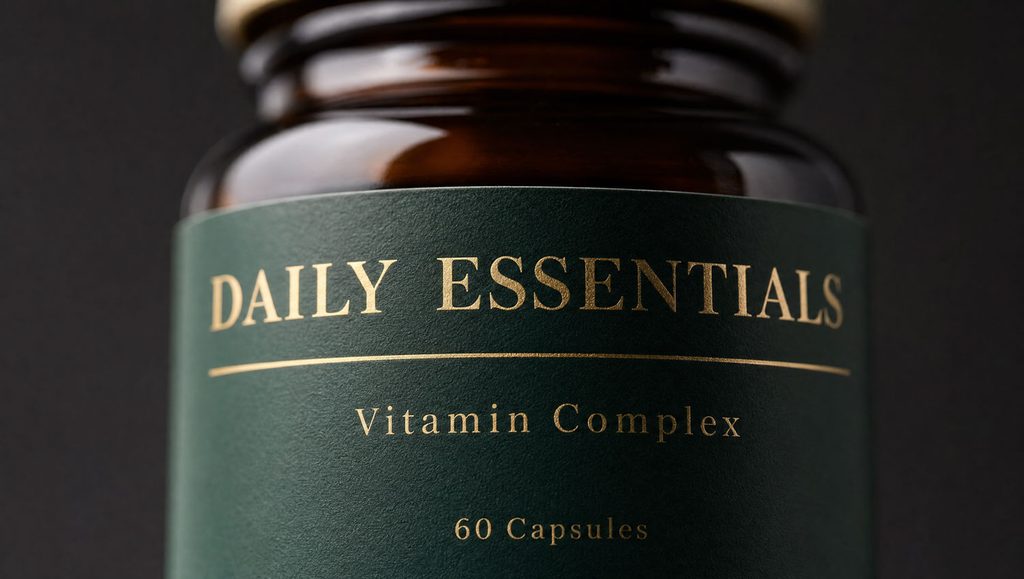
Amazon buyers zoom. A supplement label, a food packaging ingredient list, a technical specification printed on the product. If the AI model has hallucinated, softened, or altered any of this text, the image is non-compliant. Products where label accuracy is central to the purchase decision should be photographed in studio. AI can handle everything around the label; the label itself needs a camera.
Apparel fit and drape
AI-generated clothing on models has improved significantly, but drape, fit at specific body types, and the way fabric moves are still areas where a real garment on a real model produces more commercially credible results. For basic flat-lay apparel images, AI is capable. For anything where fit is a purchase driver, the gap between AI and studio is still meaningful.
Catalogue consistency at scale
Generating one great lifestyle image is straightforward. Generating 50 lifestyle images across a product range where the product looks identical in every image (same angle, same proportions, same surface detail) is significantly harder. Without a structured workflow and quality control process, AI-generated catalogues develop inconsistencies that make a brand look unpolished. This is where the difference between using an AI tool and having an AI-informed production workflow becomes visible. These same failure modes apply beyond Amazon too. Our complete guide to AI product photography in the UK covers them in more depth, along with when a hybrid workflow is worth the extra cost.
The Source Image Problem
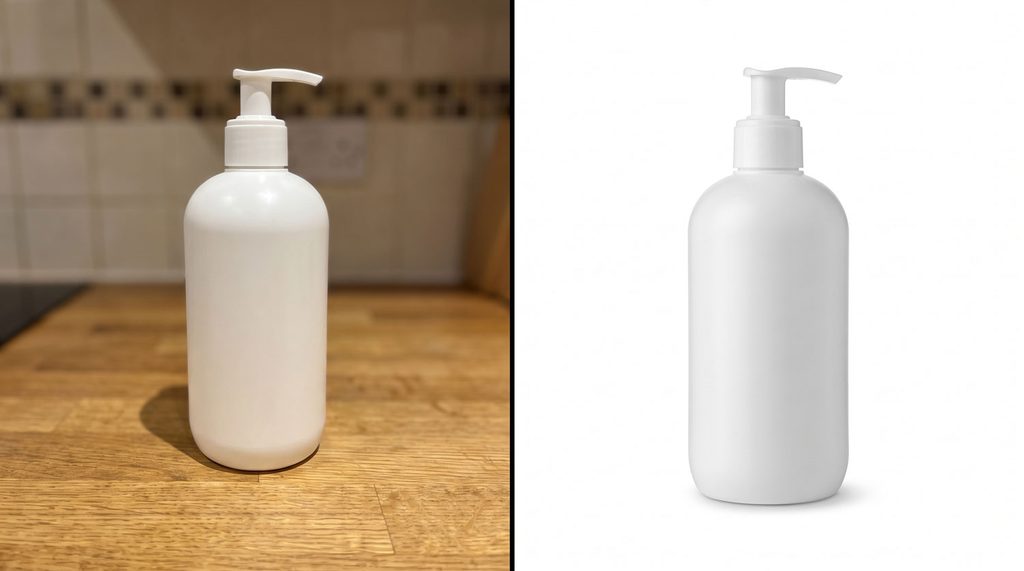
The single most common reason AI product photography underperforms for Amazon sellers is not the AI. It is the source image fed into it.
Every AI enhancement, background swap, or lifestyle placement starts from your product photograph. If that photograph was taken on a phone in natural light against a kitchen worktop, the AI is working from a weak foundation. The output will reflect the limitations of the input: uneven lighting, perspective distortion, compressed detail, inconsistent colour rendering.
A properly lit studio source image, correctly exposed with accurate colour calibration, gives the AI model the information it needs to produce consistent, high-quality outputs across a full gallery. The economics of the hybrid approach work precisely because you shoot once, properly, then generate multiple assets from that single session rather than reshooting for every variant.
What Listing Suppression Actually Looks Like
Sellers who have had listings suppressed due to image issues often report the same experience: a vague notification, no specific explanation, and no immediate clarity on which image or which rule caused the problem. Understanding the specific triggers removes most of the uncertainty.
The most common suppression causes related to product imagery are:
- Main image background that is not exactly RGB 255,255,255. Off-white, light grey, or cream all trigger this, regardless of how the image was produced
- Product filling less than 85% of the main image frame
- Text, logos, watermarks, or props visible on the main image
- A product that does not match its physical description: size, colour, or configuration differences between the image and the listing data
- Lifestyle elements in the main image slot (hands, backgrounds, context)
None of these are AI-specific. A traditionally-produced photograph can fail every one of them. The distinction is that AI workflows introduce new ways to fail the accuracy check (colour drift between the AI output and the real product, hallucinated surface detail, label alterations) that a well-run studio workflow does not.
The Compliance Check That Most Sellers Skip
Before any image goes live on a listing, it should be checked against three things: the actual physical product (does the image accurately show what ships?), Amazon’s technical requirements (background, dimensions, frame fill, file format), and the product listing data (does the image match the colour, size, and configuration stated in the bullet points and title?).
For AI-generated images specifically, add a fourth check: zoom in on any text, labels, or fine surface detail in the generated image and compare directly to the real product. AI models do not read labels. They approximate them based on pattern recognition. The approximation is often close enough for a thumbnail. It is frequently not close enough for a zoom-level inspection by a buyer who needs to verify an ingredient or a specification.
This check takes two minutes per image. Skipping it is the most common way an otherwise solid AI workflow produces a non-compliant listing.
Building a Workflow That Scales
The sellers who get the most value from AI imagery are not the ones who generate images one at a time. They are the ones who build a production workflow that can be repeated across their catalogue without starting from scratch each time.
A structured workflow for Amazon AI imagery typically looks like this:
- Professional studio photography for the main image and any detail shots where material accuracy is critical
- High-resolution studio source images used as the input for all AI-generated secondary content
- A defined set of lifestyle contexts, generated and approved once, then applied consistently across product variants
- A QA checklist run on every image before upload, covering accuracy, technical compliance, and consistency with the rest of the gallery
- A process for updating imagery when products change, such as packaging redesigns, new colourways, or updated formulations, that does not require a full reshoot for every variant
The economics of this approach work because the studio investment is made once and then applied across multiple AI-generated assets. A single studio session that produces ten high-quality source images can support a gallery of forty or fifty finished assets across lifestyle, infographic, and variant content, without additional shoot days.
Sellers running a Shopify store alongside their Amazon listings face the same challenge at greater scale: the same brand-consistency principles apply to Shopify stores, where catalogue size makes inconsistency far more visible.
When to Use a Consultant Rather Than a Tool
AI photography tools are accessible and improving rapidly. For sellers with simple products, clean shapes, and a small catalogue, a tool-led workflow with careful QA is entirely viable.
The case for working with an expert-led AI production workflow is strongest when:
- Your products have complex materials, fine detail, or label content that needs to be accurate at zoom level
- You are managing a catalogue of more than 20 SKUs where consistency across the range matters for brand perception
- Previous AI-generated images have produced inconsistent results or compliance issues
- You are launching a new product line where the photography needs to establish rather than just maintain brand standards
- Your competitors’ imagery is already high quality and a generic AI output will not differentiate your listing
The question is not whether AI is involved. It is whether the workflow directing the AI is producing images that are accurate, consistent, compliant, and commercially effective. Those are photographic judgements, not software settings.
Get a Quote for AI-Enhanced Amazon Product Photography
Products Photography.AI works with Amazon sellers and e-commerce brands to plan and produce imagery that meets platform requirements and drives conversions. Whether you need studio source images to feed into an AI workflow, a full gallery of AI-enhanced assets for a new listing, or an audit of your existing imagery, get in touch to discuss what your catalogue needs.
Frequently Asked Questions
Is AI product photography allowed on Amazon?
Yes, with one clear limit. Secondary images (positions 2 to 9 in your gallery) can be AI-generated or AI-enhanced provided they accurately represent the product. The main image (position 1) must be a real photograph of the actual product on a pure white background. Amazon has not published a disclosure requirement for AI use in secondary images as of 2026, despite widespread claims to the contrary. The governing rule is accuracy, not origin.
Can AI replace studio photography for Amazon listings?
Not entirely, and not for every product. AI works best for lifestyle scenes, background variations, and secondary imagery built from a strong source photograph. Products with reflective surfaces, transparent packaging, fine label detail, or complex textures still need studio photography as the foundation. The most effective approach is a hybrid one: real photography for the shots where accuracy is non-negotiable, AI for the variations that would otherwise require multiple shoot days.
What is the main image requirement for Amazon in 2026?
The main image must show the actual product on a pure white background (RGB 255,255,255 exactly), with the product filling at least 85% of the frame. No text, logos, watermarks, props, or lifestyle elements are permitted. The minimum resolution is 1,000 pixels on the longest side, with 2,000 pixels recommended to enable Amazon’s zoom function. These requirements apply across most categories, with some exceptions for apparel, jewellery, and large appliances.
What causes Amazon to suppress a listing over image issues?
The most common triggers are an off-white main image background (anything other than exact RGB 255,255,255), a product that fills less than 85% of the main image frame, text or logos visible on the main image, and imagery that does not accurately match the physical product. Suppression can happen to AI-generated and traditionally-photographed images alike. The cause is almost always a compliance failure rather than the method of production.
How many images should an Amazon listing have?
Amazon allows up to nine images and recommends at least six, along with at least one product video. Listings using the full nine-image gallery consistently outperform those with fewer images, because each slot has the opportunity to answer a buyer question or address a purchase objection before they leave the page. The order matters: main image first, then detail and feature shots, then lifestyle content, then infographics and comparison images.
What is the biggest mistake sellers make with AI product photography?
Using a low-quality source image. Every AI enhancement or lifestyle generation starts from your product photograph. A phone image taken in natural light will produce inconsistent, lower-quality AI outputs regardless of which tool processes it. A properly lit, high-resolution studio source image gives the AI model accurate colour, surface detail, and proportions to work from, and the quality difference in the final output is significant. The source image is the single biggest variable in the quality of AI-generated Amazon imagery.
Do I need to disclose AI use on my Amazon listing?
There is no documented Amazon policy requiring sellers to disclose AI use for product images as of 2026. The requirement some sellers reference applies to Amazon’s Kindle Direct Publishing platform, not seller listings. The relevant obligation is accuracy: any image, AI-generated or otherwise, must correctly represent the product that ships. Sellers who also sell into EU markets should be aware of the EU AI Act’s Article 50 transparency requirements, which took effect in August 2026 and may apply depending on how AI imagery is used in their marketing.

Dee Patel is an AI Visual Content Consultant and commercial product photographer with 14 years of experience. Dee advises UK e-commerce brands, retail businesses, and creative agencies on AI visual content strategy, production workflows, and cost efficiency. Based in the West Midlands.