
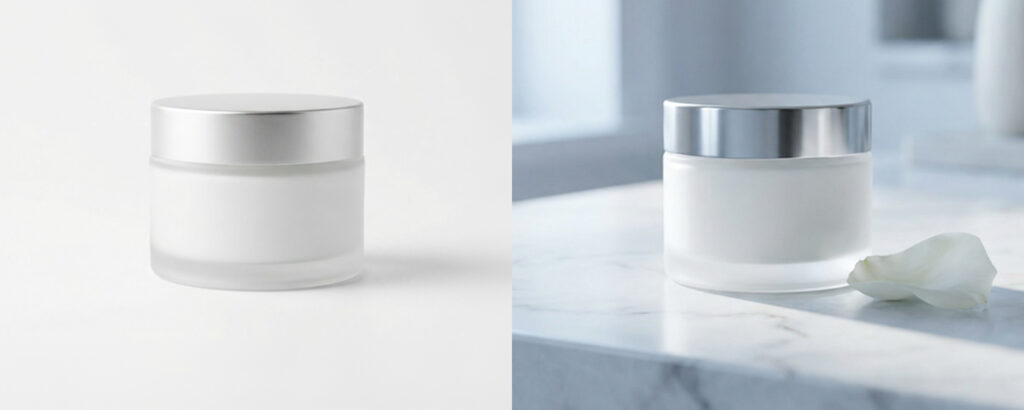
You’ve got a product ready to sell. You know great images will make the difference between someone clicking through and someone scrolling past. But booking a studio, sourcing props, arranging samples, briefing a photographer, and waiting three weeks for the final files? That’s a process that eats time, budget, and energy and it has to happen every time your range changes, a season turns, or a new platform demands a different format.
There’s a better way to do this. AI product photography has moved well beyond the novelty stage. Brands and marketing teams are using it right now to produce high-quality imagery faster, at a fraction of traditional production costs. This post explains what it is, what it can realistically deliver, and how to start using it for your e-commerce business.
Why Traditional Product Photography Is Slowing Brands Down
The economics of traditional product photography haven’t changed much in a decade, but the demands on e-commerce brands have. You need more content, across more platforms, more frequently and each new image still requires a studio booking, a photographer’s day rate, prop hire, and post-production time.
For a growing e-commerce brand, this creates a real bottleneck. Sample logistics alone can delay a shoot by weeks. If a product changes, packaging update, new colourway, seasonal variation, you’re back to the beginning. Shoots planned months in advance become outdated before the images are even used. And that’s before you factor in the approval rounds, the reshoots when something isn’t right, and the gap between what was briefed and what actually gets delivered.
The volume problem compounds things further. A brand selling across its own website, Amazon, and two or three social platforms doesn’t need one great image per product, it needs five or six, in different formats, with different contexts, updated regularly. Traditional photography wasn’t designed for that cadence, and the cost structure reflects it.
Marketing managers know this problem well. The brief comes in, the shoot gets booked, the images arrive late, and by the time everything clears approval, the window for the campaign has narrowed. Brand owners feel it differently, usually in the invoice, or in the decision to delay a product launch because the photography budget isn’t there yet.
Neither situation is sustainable. And increasingly, it isn’t necessary.
What AI Product Photography Actually Is
AI product photography uses machine learning models to generate photorealistic product images, lifestyle scenes, hero shots, contextual backgrounds, using your existing product imagery or digital assets as a starting point.
It is not a filter. It is not Photoshop automation. The outputs, when done correctly, are indistinguishable from studio photography to most viewers and in some cases, they’re better, because you’re not constrained by what you could physically build in a studio on the day.
The inputs are simpler than most people expect. A clean product shot on a white background, or in some cases just a high-resolution digital file, is enough to get started. From there, AI tools can place that product into any environment, a kitchen countertop, a bathroom shelf, a lifestyle scene with natural daylight, without the product ever leaving the warehouse.
The technology has also matured considerably in the past two years. Early AI image tools struggled with reflective surfaces, fine text on packaging, and complex product shapes. Current generation tools handle these with significantly more accuracy, which is why the output is now genuinely usable for commercial purposes rather than just interesting as a demonstration.
What it isn’t, and this matters, is a push-button process. The quality of the output depends heavily on how the prompts are written, which tools are used, and whether the person guiding the process understands photography. More on that shortly.
The workflow typically looks like this: a product is photographed cleanly on a plain background or a high-resolution digital file is used if the product exists only as a 3D render or packshot. That image is then used as a reference input, telling the AI what the product actually looks like: its shape, proportions, label design, surface finish. From there, a prompt describes the environment, the lighting quality, the mood, and any compositional requirements. The AI generates an image that places the product convincingly into that scene.
The key distinction from earlier AI image tools is the use of reference images rather than text-only generation. Text-only prompts produce generic results, a bottle that looks like a bottle, not your bottle. Reference-based generation preserves the specific visual identity of the product: the exact label layout, the particular shape of the cap, the precise colour of the packaging. That’s what makes the output commercially usable rather than just visually interesting.
What You Can Realistically Create With AI Today

The range of content that AI product photography tools can produce has expanded significantly, and AI product photography is now viable for most commercial use cases. Here’s what’s genuinely achievable right now:
- Lifestyle scenes without a location shoot: place your product in a contextually appropriate setting, whether that’s a minimalist home interior, an outdoor table setting, or a retail shelf environment
- Multiple colourway variations from a single hero shot: generate a red, green, and navy version of the same product without photographing all three
- Seasonal content without reshoots: adapt existing imagery for Christmas, summer, or a promotional campaign without rebooking a studio
- Platform-specific formats: create square crops for Instagram, vertical formats for TikTok, and wide banners for email headers from one generation session
- Short-form video content from still images: animate existing product shots into subtle motion clips suitable for social media and ads
For e-commerce brands managing a wide product range, the implication is significant. Content that previously required multiple shoot days can be produced in hours.
To make that concrete: a brand with 40 SKUs that needs lifestyle imagery across three seasonal campaigns would traditionally be looking at multiple shoot days, location or set costs, and a post-production pipeline that takes weeks to clear. With an AI workflow built on existing product photography, the same output can be generated in a matter of days, with the added flexibility to adapt, revise, or produce additional variants without going back to the start. That’s not a marginal efficiency gain. It’s a different way of working.
Where Photography Expertise Still Matters
This is the part most articles on AI product photography skip, and it’s important.
AI product photography tools produce exactly what you tell them to. If you don’t understand why a certain lighting setup works, you won’t know how to describe it. If you can’t read a composition and identify why it feels off, you won’t be able to correct it in a prompt. The tools have democratised production, but they haven’t replaced the knowledge that makes images actually sell products.
Lighting logic transfers directly. The way a hard side light creates depth on a textured surface, or how a diffused front light keeps a label readable, these are things a trained eye picks up immediately. Without that understanding, AI-generated images can look plausible without being compelling.
Brand consistency is the other area where expertise earns its place. A series of product images that look different from each other, different colour temperatures, inconsistent shadow behaviour, varying depth of field, signals amateur production to a buyer, regardless of how they were made. Maintaining visual coherence across a range requires deliberate decisions at every stage.
For e-commerce brands, this means the best results come from working with someone who understands both the tools and the photography principles behind them, not from handing a product shot to an AI and hoping for the best.
For e-commerce brands, this means the best results come from working with someone who understands both the tools and the photography principles behind them, not from handing a product shot to an AI and hoping for the best. Take a look at our services to see how we approach this.
How to Get Started: A Simple Framework
You don’t need to overhaul your entire content workflow overnight. Here’s a practical way to start:
- Audit your existing assets: identify which products have clean, usable photography already, even if it’s basic white-background work. These are your starting points. If you have brand guidelines or existing lifestyle imagery, gather those too. f you’re not sure what you have or how usable it is, an AI visual content audit can map that for you.
- Identify your highest-priority content gap: where are you losing ground right now? Seasonal imagery that’s out of date? A new product line with no lifestyle content? A platform you’re not active on because you don’t have the right format? Start there.
- Run a single test case: pick one product, one use case, one platform. Generate a small set of images. Compare them against what you currently have. This tells you quickly what’s working and where refinement is needed, without committing your whole content budget to an unknown process.
- Review, refine, and scale: AI product photography improves with iteration. The first generation gives you a baseline. From there, you build a working prompt structure that can be applied across your range consistently.
The learning curve is shorter than most brands expect. The bigger investment is in setting up the process correctly at the start, which is where getting the right guidance pays for itself quickly.
The audit stage is worth doing properly. Many brands discover that they have more usable assets than they thought, white background shots from previous shoots, packshots from suppliers, or brand photography that was never repurposed. These become the raw material for the AI workflow. The quality of those starting assets directly affects the quality of everything generated from them, so if gaps exist it’s worth addressing them before investing in generation at scale.
The test case step is important because it sets realistic expectations before you commit resources. Choose a product that represents a real content need, something you actually need imagery for, not just a convenient test subject. Generate a small set of images against a specific brief: a particular lifestyle context, a specific platform format, a defined visual style. Then evaluate against three criteria: does it accurately represent the product, does it meet the platform’s technical requirements, and does it match your brand’s visual standard? The answers tell you where the process is working and where it needs refinement. Scaling from there is largely a matter of systematising what worked. The prompts, the reference images, the output settings, these become a repeatable template that can be applied across your range. The first product takes the most time. Each subsequent one is faster. That’s the compounding advantage that makes AI investment is in setting up the process correctly at the start, which is where getting the right guidance pays for itself quickly.
Frequently Asked Questions
How much does AI product photography cost?
It varies depending on whether you’re using a managed service or running tools yourself. A done-for-you service from a specialist will typically be structured as a monthly retainer or project fee, and will cost significantly less than equivalent traditional photography once you account for studio hire, day rates, and post-production. The comparison to offshore retouching services isn’t quite right either, AI generation from digital assets is solving a different problem entirely.
As a rough guide: a traditional lifestyle shoot with location, crew, and post-production for a mid-sized product range might cost several thousand pounds and take three to four weeks. An AI-generated equivalent, built on existing photography, typically costs a fraction of that and can be turned around in days. The saving compounds over time, every seasonal refresh, every platform variant, every additional product added to the range becomes faster and cheaper than it would have been through the traditional route. For brands managing ongoing content needs rather than one-off shoots, the economics shift significantly in favour of an AI workflow.
Do I need a photographer to use AI image tools?
Not to use the tools, but to get consistently good results, yes, photography knowledge makes a meaningful difference. Understanding lighting, composition, and brand visual consistency determines whether AI-generated images look professional or merely passable. Many brands start by experimenting themselves and then bring in specialist support once they understand what good looks like.
Is AI product photography good enough for e-commerce?
For most e-commerce applications, yes, lifestyle imagery, contextual scenes, social content, and platform-specific formats are all well within what current tools can produce to a professional standard. The one area that still benefits from traditional photography is primary hero shots for high-end retail, where exact colour accuracy and surface texture under controlled lighting remain important. For everything else, AI product photography meets the quality bar for professional e-commerce use. It’s also worth checking the product image specifications across major platforms before you finalise any workflow.
Conclusion
AI product photography isn’t a replacement for every situation, but for the vast majority of e-commerce content needs, it removes the constraints that have always made visual content expensive, slow, and difficult to scale.
AI product photography has matured to the point where the bottleneck is no longer the tools. It’s knowing how to use them well. Understanding lighting, composition, brand consistency, and platform requirements is what separates imagery that converts from imagery that merely exists on a product page. That’s where experience makes the difference.
For brand owners, the opportunity is straightforward: reduce your dependency on the traditional shoot cycle, get more content from your existing assets, and move faster when markets and seasons demand it. For marketing managers, it means fewer delays between brief and delivery, and a content workflow that can actually keep pace with the platforms you’re publishing to.
The shift is already happening. The brands who start now, get the process right, and build it into their workflow will have a genuine advantage over those who wait until it becomes the obvious thing to do. Before you commit to a workflow, it’s worth understanding what AI can and can’t do for your product images and why AI product images fail commercially when the process isn’t set up correctly, so you go in with realistic expectations.
What This Means for Your Brand
The shift to AI product photography isn’t coming, for many e-commerce brands, it’s already happening. The question is whether you’re steering that process with the right knowledge behind it, or leaving quality and consistency to chance.
The brands getting the most from it aren’t necessarily the ones with the biggest budgets. They’re the ones who understood early that AI tools are only as good as the person using them and invested in getting that part right. Starting with one product, one platform, and a clear brief is enough to see whether this approach works for your range. Most brands who try it don’t go back.
For a comprehensive overview of everything involved — costs, compliance, quality standards, and when to bring in professional help — our complete guide to AI product photography UK covers it all in one place.
If you want to see what this could look like for your specific products and content needs, we’re happy to show you. Get in touch and we can talk through where AI imagery makes the most sense for your brand.
Dee Patel is an AI Visual Content Consultant and commercial product photographer with 14 years of experience. Dee advises UK e-commerce brands, retail businesses, and creative agencies on AI visual content strategy, production workflows, and cost efficiency. Based in the West Midlands.